
Welcome to our Support Portal. Search for answers using the search box below, or create a support ticket if you cannot find your answer.
Section and Form Permissions
Key Points
-
Section and form permissions control who can view, edit, and add records.
-
Permissions are managed at both the section and form levels.
-
Access is assigned to Groups, not individual users.
-
Additional rules, such as Read Own and Edit Own, allow for secure, role-based visibility.
-
Default permissions are provided but should always be reviewed.
Accessing Section Permissions
Step 1 – Open Sections
To manage section permissions:
-
Go to the System Menu
-
Click Sections

You will see a list of all sections that appear on the left-hand side of FlowLogic.
Setting permissions correctly ensures:
-
Staff only see relevant information
-
Privacy and security are maintained across the system
Viewing Section Access
Step 2 – Select a Section
Choose any section to view or edit its permissions.
Example:
-
Participant section

Step 3 – Open Access Control
Inside the section details, locate the Access Control area.
Click the plus (+) button to expand and view:
-
Which groups have access
-
Whether they can read, edit, or add records
This gives a clear overview of who can interact with that section.
Understanding Section-Level Permissions
At the section level, permissions control whether a group can:
-
Read – view records
-
Edit – update records
-
Add – create new records
These settings ensure each group can perform only the actions appropriate to their role.
Form-Level Permissions
Each section contains multiple forms.
Every form has its own permissions, allowing more detailed control.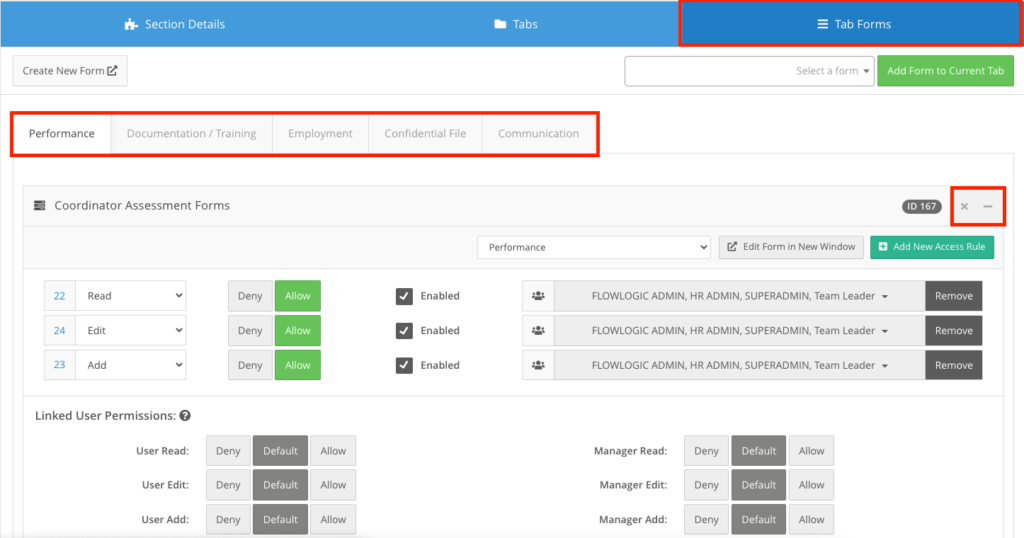
This means:
-
A group may view a participant record
-
But only edit specific forms within that record
This creates granular and secure access control.
Read Own / Edit Own Permission Rules
FlowLogic also includes two additional rules:
Read Own
Allows users to view only the records they created.
Edit Own
Allows users to edit only their own submissions.
These are commonly used for:
-
Incident reports
-
Staff Basic Details
-
Shift Notes
Managing and Removing Permissions
Permissions are managed by adding or removing groups.
To deny access:
-
It is best to remove the group from access rules.
-
Avoid using hard deny unless necessary.
This reduces the risk of locking users out accidentally.
To remove an access rule:
-
Double-click the Remove option beside the group.
Default Permission Templates
FlowLogic includes default permission templates.
These are designed to match common organisational needs.
You do not need to configure every form manually unless:
-
You create a new form
-
You need to customise permissions
However, it is recommended to review default settings to ensure they suit your organisation.
Testing Permissions
Best practice is to test permissions regularly.
To do this:
-
Log in as different users
-
Confirm what each role can:
-
View
-
Edit
-
Add
-
This ensures:
-
Security
-
Correct access levels
-
Confidence in your system setup
Additional Staff Section Permissions
The Staff section includes advanced permission options.
Linked User Permissions
If a user account is linked to a staff profile:
-
Access may be automatically granted to that record.
Manager Permissions
Managers can be given specific rights to:
-
Read
-
Edit
-
Add
These permissions extend standard access and support organisational hierarchies.
Field Permissions
Each field in the system will follow the same process outlined above in section access for configuration.
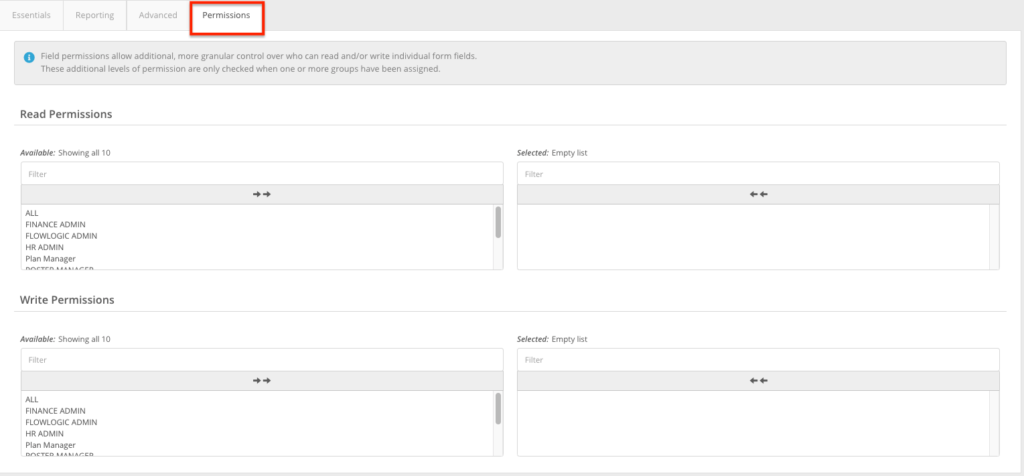
Within each form you have the ability to apply permissions per field similarly to the above. Please refer to the form management chapter for more details on how to access the access controls shown below:

Here you can choose to add Read and write permissions. Before allowing any groups here, by default everyone will be able to view the fields. To enable the permissions, simply select the groups you would like to have access on the left. The groups will then sit on the right side of the tables. To remove their access simply select the groups on the right.
Outcome
You now understand:
✔ How to access and manage section permissions
✔ How section and form permissions work together
✔ How to apply Read Own and Edit Own rules
✔ How to remove or adjust group access
✔ The importance of testing permissions
✔ How linked users and manager overrides work
Section and form permissions are essential for building a secure, flexible, and well-organised FlowLogic system.