
How Can We Help?
Search for answers or browse our knowledge base.
Logging out
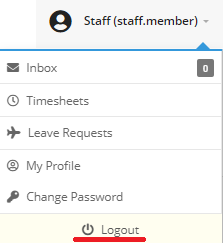
- Select your User profile in the top right of the page to bring up the User Profile dropdown menu.
- Select the “Logout” button to be redirected to the login screen.
NOTE: If you have clicked Clock ON, you will remain clocked on even when you are logged out until you log back into FlowLogic and manually click the Clock OFF button.
For account security, please ensure that you logout when you finish using Flowlogic.